
Covers for an earbud case and tips for the buds inside
Earbud add-ons follow two different things: the charging case, which changes more often than the earbud name suggests, and the nozzle on the buds themselves.
Earbud cases and replacement tips
Earbud add-ons come in two kinds that follow different things. A cover for the charging case follows the case: its outline, the hinge, the status light, the charging port and any speaker holes or lanyard loop. Replacement tips follow the buds: the nozzle each tip clips onto, and the size you already wear.
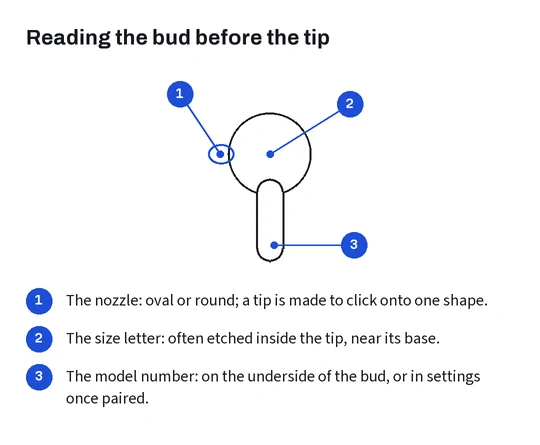
The two do not line up neatly with the earbud name. One maker’s identification page tells owners to identify their charging case by the location of the status light and other details, and states that each case works only with its own earbuds. The buds carry their model number on their underside; the paired phone shows it too.
This page covers the covers and the tips. It does not cover the buds or the cases themselves.
One earbud name, several charging cases
The case changes more often than the earbud name does, and every change moves something a cover has to fit around.
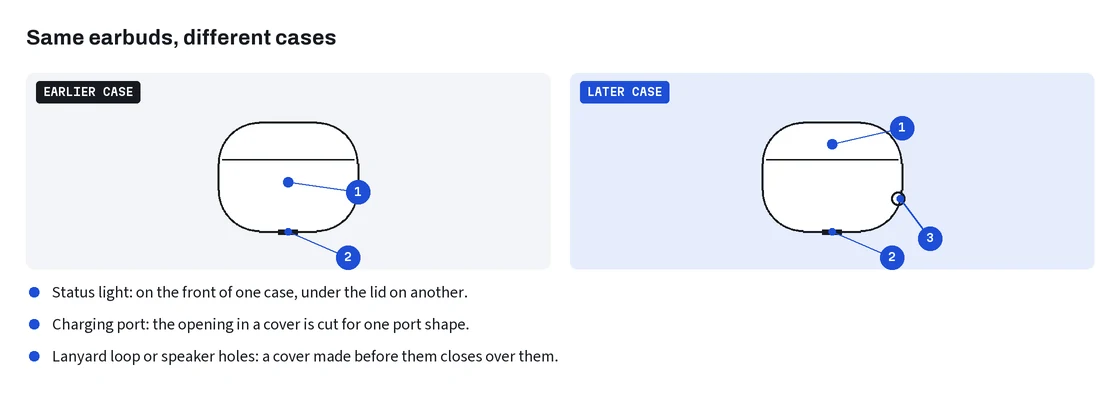
The identification page quoted above lists, for one premium earbud generation, a charging case with the older proprietary port and a later case with a USB-C port, sold under the same earbud name. For its newest standard earbuds it lists a plug-in charging case and a wireless charging case as separate models, the wireless one with an external speaker on the bottom. Status lights sit on the front of some cases and inside the lid on others.
Each of those differences is a place where a cover can be wrong: a port opening of the wrong shape, a solid wall over a speaker, no window for the light, no gap for a lanyard loop. Cover listings usually offer the variants as options named by port or by year. Read the case, not the buds, and match the option to it: port shape on the bottom, light position, speaker holes, loop.
Ear tips and the nozzle they clip onto
Tips look universal and are not. The maker of one popular in-ear model says on its ear tip page that the tips are designed specifically for each model and that owners should use the tips that come with their earbuds; it also describes the tips of successive generations as noticeably different in mesh and stiffness. Third-party tips are made the same way, for one nozzle shape.
Size is printed on the tip itself in many cases. The same page explains that the size letter is etched inside the tip near its base, visible when you roll the edge back. Check yours before choosing a size option; size letters do not mean the same thing from one maker to the next.
Foam tips and silicone tips sit and seal differently. That is a preference, not a fit question, but listings often bundle both, so read which one an option contains.
Reading a cover listing’s photos
The photo that matters in a case cover listing is the bottom view. It shows the shape and size of the port opening and whether there is a hole for a speaker. The front view shows whether the light has a window, and the hinge view shows whether the cover is one piece or two.
Lifestyle photos with a hook clipped to a bag show the finish, not the fit. If a listing has no bottom view and the options are named only by color, it is guessing on your behalf; pick a listing that names the case version in the option.
A practical check: lay your own case on its back and photograph the bottom edge, then compare the port and speaker openings with the listing’s bottom view. If the listing has no bottom view at all, ask the seller for one through 100buy before you pay.