
Field notes
100buy Spreadsheet: the detailed reading room
The original specialist explanations and interactive tools, collected in one place. Start with the buying guide for the full order journey.
Device fit card: name the device, then the add-on
How to use the tool: tap the device you own, then the kind of add-on you are looking at. The card lists the two or three things that decide whether that add-on fits, where each one is usually printed or shown, the near-misses that catch buyers out, and one line each on what a 100buy stock-in photo can and cannot settle.
It asks for no model text and gives no yes or no. That last step is yours: hold the card against the option name in the listing and against the device on your desk. Add-ons that make no sense for a device (ear tips for a laptop, say) gray out.
The card appears here once the page script has run.
What 100buy Spreadsheet Model Match is
Spreadsheet, as the word is used across these pages, means a catalog you browse by category: shelves of product cards from Chinese marketplaces that a shopping agent such as 100buy can buy and ship for you. Most shelves are about taste and size. A smaller group, the add-ons for devices people already own, turns on something stricter: the case, film or strap only works on the exact model it was cut for.
Model Match reads that group and nothing else. It does not rank sellers or tell you a find is good value. It shows where a device prints its model number, how listing titles string several models together, which near-identical versions are the usual mistakes, and what 100buy’s warehouse does and does not look at once an add-on arrives.
Every page comes back to the same habit: read the model on your device, read the model on the listing, and only then think about color.
Start with the number on your device
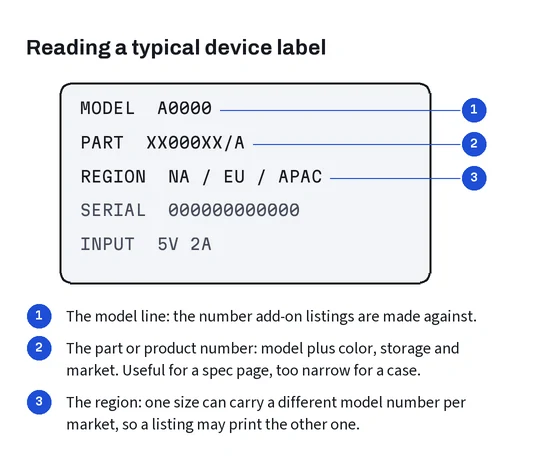
Marketing names travel well and identify badly. One family name usually covers a regular model, a larger one and a premium one, sometimes in two generations that look almost the same, and the add-on makers know the difference even when the shopper does not. The number that settles it is printed somewhere quieter: in the settings screen, inside a SIM tray slot, engraved on the back of a watch, on a sticker under a laptop, above a QR code on a controller.
One phone maker’s support page, for instance, explains that the number shown first in settings is a part number and that tapping it reveals the model number underneath. Details like that are collected, device by device, on the model numbers page.
Write the number down before you open the catalog. It takes a minute and it is the one piece of information no seller, agent or warehouse photo can supply for you.
Device families on this site
Each family has its own way of hiding the model and its own favorite near-miss. The pages below take them one at a time.
Phones and tablets turn on generation and suffix, with the camera block as the giveaway. Smartwatches turn on case size and connector, and one case size number has changed groups between generations. Earbud covers follow the charging case, not the buds, and replacement tips follow the nozzle of one generation. Laptop sleeves go by body size in millimeters; e-reader covers go by generation. Controller skins, console shells and camera cages are molded around a single body.
Phones and tablets · watches and wearables · earbud cases and tips · laptops and e-readers · controllers and cameras · listings that name several models.
What changes when 100buy buys it for you
As a shopping agent, 100buy buys the add-on from the Chinese seller, receives it at its warehouse, takes inspection photos and ships it on with the rest of your parcel. Its inspection notes describe a count of the items plus a comparison of color, size and options with what you ordered, while for electrical, digital and peripheral goods the model, the quality and the spare parts fall outside the inspection.
So the warehouse will catch a blue case sent instead of a black one, and will not catch a case for the regular phone sent instead of the larger one. You can narrow that gap yourself: 100buy sells extra close-up photos, and asking for one of the packaging label when you place the order costs very little. The through-100buy page walks through the inspection wording, returns on sealed packs, fees and the exchange rate.
How these pages are checked and kept
The 100buy rules on these pages were checked against its help center on 19 October 2026, and each device fact comes from the device maker’s own support page, linked where it is used. Where a maker’s page is ambiguous, the page here says so instead of guessing; the watch band size groups are the clearest example.
Nothing here was test-fitted. The site does not buy add-ons to try them, so you will not read that a case fits a phone. What you will read is where to look and what to compare. The about page lists the sources, the last update and how to report a mistake; the help page explains the terms that keep coming up.
Device makers rename, regroup and retire products, so the most perishable facts here are size groups and identification lists. When one of those pages changes, the device page that cites it is corrected and the change is dated on the about page.