
Many models in a listing title: picking the option that is yours
Add-on listings often stack a run of model names into one title and leave the real choice to the option list. Reading them in the right order avoids the most common wrong pick.
Listings that cover several models at once
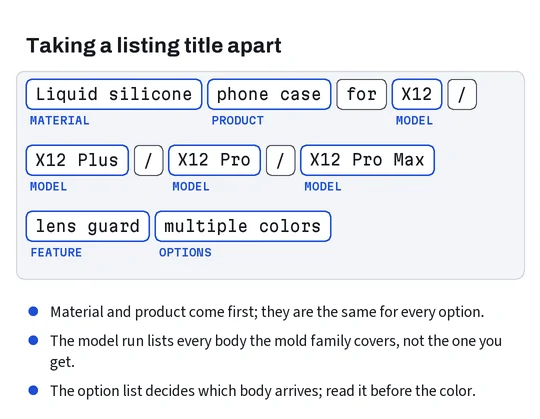
Open almost any case or screen protector listing and the title reads like an inventory: one material, then a run of model names separated by slashes. Sellers do it because one design is molded for a whole family and because every model name in the title is another search that can find the listing.
The title is the menu, not the order. What you actually buy is the option you select, and the option list is where the seller narrows the run of names down to one body per choice. The cart and, later, 100buy’s order record keep the option name, not the title.
So read a multi-model listing from the bottom up: option list first, then the option photo if the seller added one, then the size chart picture, and the title last, as a check that the seller is selling what you think.
Connector types printed in listing titles
Plug names are fit information too. Cables, earbud case covers and some controller shells name a connector, and the names vary.
A cable has to match the port on your device; a cover for an earbud charging case has to leave that port open in the right shape and place. Listings written for buyers in China usually say Type-C rather than USB-C, and the older proprietary connector of one phone maker often appears under its own trade name or simply as “for older phones”. Magnetic and wireless charging appear as features, not connectors; if you charge that way, look for the cover listing to say it allows it.
Earbuds add a twist. One family of earbuds has been sold with a cable-charging case and a wireless-charging case, then with a newer connector, all under the same name. Covers are cut for one of those cases, and the listing usually offers them as separate options named by connector. The option name, again, is what to match. The electrical side of chargers and cables, voltage and plugs, is outside this site; it is the connector shape that concerns a fit.
Option names one suffix apart
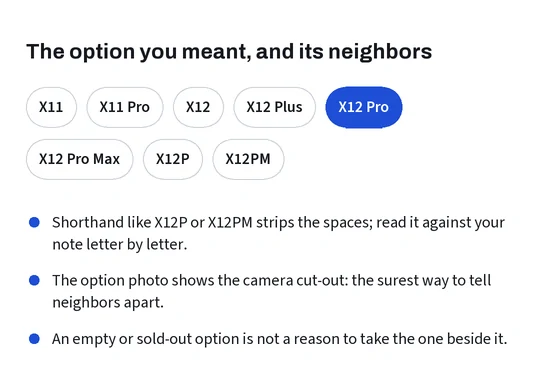
The commonest wrong pick is the neighboring option. Option lists are dense, often abbreviated, and sometimes written in a shorthand that strips the spaces out of the model name. A regular and a larger model, or a regular and a premium model of the same generation, sit next to each other and differ by a suffix of one word or one letter.
Two habits help. First, read the option name aloud against your fit note, suffix included. Second, open the option photo: many sellers attach a picture per option, and the camera cut-out in that picture shows which body the mold was made for far more reliably than an abbreviated label.
If the only option that looks like yours is out of stock, do not pick the nearest neighbor hoping it will stretch. Cases and films are cut, not sized; a near miss is a miss.
Signs a seller cut the add-on for your model
How to judge a seller of device add-ons comes down to how much fit information the listing carries. Good signs: a photo per option, a size chart image in millimeters, an option list that mirrors the model run in the title, and close-up photos of the cut-outs. Weak signs: one shared photo for every option, a title that lists models the option list does not offer, and size charts that give only screen inches.
None of these proves the add-on fits. They tell you whether the seller thought about fit at all, which is the best reading a listing allows before anything ships. Ratings and sales counts, where the marketplace shows them, say little about which option buyers chose.
A question to the seller is the other test. A seller who answers “which option fits this model” with an option name and a photo has thought about fit; one who answers “all models available” has not.
When the title and the option list disagree
Sometimes the title promises your model and the option list does not have it. The listing may be old, the option may have sold out and been removed, or the title may be padded with every model name the seller could think of.
Before you pay, ask. Messages to the seller go through 100buy, and the order form that would carry such a note sits behind the login, so check what that form offers when you are signed in. Ask one closed question: which option is cut for this exact model number. If the answer is vague, choose another listing. The through-100buy page covers what happens after you order and why a label photo is worth requesting.