
Model numbers, marketing names and the places a device hides them
A marketing name tells you the family. The model number tells an add-on maker which mold to use. This page covers where devices print that number and how to read it before opening a listing.
Model numbers versus marketing names
The name on the box lid is a family name. It is what people say in shops and what sellers put first in a title, and it usually covers more than one physical device: a regular and a larger version, a premium version with a different camera, sometimes two generations sold side by side. An add-on maker does not work from that name. It works from the drawing of one body, and that body has a model number.
Four identifiers turn up again and again. The marketing name tells you the family. The model number tells you the body. A part or product number adds color, storage and market on top, which is more than a case needs but exactly what a spec page search needs. A serial number belongs to your single unit and says nothing an add-on listing can use.
One laptop maker puts it bluntly on its support page: the name and number on the front of a product often stand for a whole series of similar-looking models with different options and parts. That is the trap in one sentence. The front of the device names the series; the label or the settings screen names the model.
Where a device prints its model number
No two device families hide it in the same place. These are the spots the makers themselves point to.
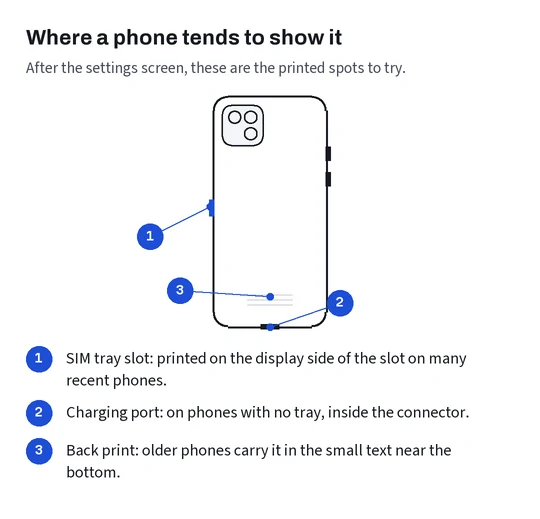
Phones: the settings app, in the About screen. One phone maker notes that the code beside “Model Number” is first a part number and that tapping it shows the model number; on its newer phones with a SIM tray the number is printed inside the tray slot, on the display side, and on phones without a tray it sits inside the charging connector. Android phones list the model in Settings, under About phone.
Tablets: the settings screen again, and on many tablets in small type on the back cover, which the maker’s identification list uses as its key. Watches: engraved on the back together with the case size, per the watch identification page. Earbuds: on the underside of each bud and in the paired device’s settings.
Laptops: a label underneath near the regulatory marks, or the system information screen. Controllers: one console maker prints it on the back above the QR code, eight characters long. Handheld consoles: on the rear, and on one model behind the fold-out stand. Cameras: the body name on the front or top plate, with the serial label on the base plate. E-readers: the device information screen on many models.
Settings screens and printed labels
When the device switches on, the settings screen is the easiest read: no magnifier, no bright lamp, no squinting into a tray slot. The phone maker quoted above still suggests bright light overhead for the printed spots, which tells you how small that print is. Photograph it with your phone camera and zoom in rather than trying to read it by eye.
When the device does not switch on, or when you are buying for someone else’s device, the printed spots are all you have. Stickers under laptops wear off; the box the device came in usually carries the same numbers on its label, which is why it is worth keeping.
Whichever you read, copy the whole string, letters and all. Two models that differ by one trailing letter can be the regional twins of one body, or two different bodies. The next section explains the first case.
Buying for a relative is where this goes wrong most often. Ask them for a screenshot of the settings screen rather than the name they remember: people describe a phone by its color or the year they bought it, and neither tells an add-on seller anything. A screenshot of the About screen takes seconds and removes the guesswork.
Region codes and why one size carries two numbers
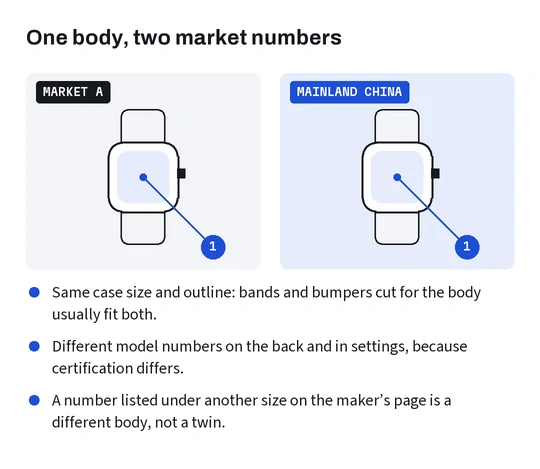
The watch maker’s identification page lists each case size with two or more model numbers: one for North America, Europe and Asia Pacific, and another for China mainland. The body is the same; the radios and certification differ. Phones and tablets often follow the same pattern.
That matters because most sellers on the catalog’s marketplaces are in China. A listing, a size chart picture or the text on a packaging insert may print the mainland number for a device you know by a different one. Add-on makers usually cut for the body and the size, so a case listed against the mainland twin normally fits the same body sold elsewhere.
Normally is the key word. Before you treat an unfamiliar number as a twin, check it against the maker’s identification list: if it appears there under the same size and generation, it is a regional version; if it appears under another size, it is a different body, and the listing is not for you.
A fit note to keep beside you while browsing
Before opening the catalog, write a short note: device family, full model number, generation or year, the size that matters for this kind of add-on, and anything you keep on the device, such as a case under a sleeve or a keyboard folio on a tablet. Add the ports and buttons you care about, because those are what a cut-out has to clear.
It sounds fussy. In practice it is the quickest way to choosing a listing without second guesses: you compare each option name against one short note instead of against your memory, and you have the right words ready if you message the seller through 100buy before paying. The Device fit card on the home page tells you which lines matter most for each pairing.
Keep the note next to your 100buy order history. When the stock-in photos arrive, the label close-up is read against the same lines, and if you reorder later, a second case or a replacement film, the note already holds everything. One note per device is enough; a household with three phones of one family needs three notes, because their suffixes rarely match.