
Sleeves sized by the body, covers sized by the generation
Laptops and e-readers split along a useful line: a sleeve only has to swallow a body of the right size, while a clip-on shell or a reader cover has to match one generation exactly.
Laptop sleeves sized by the body, not the screen
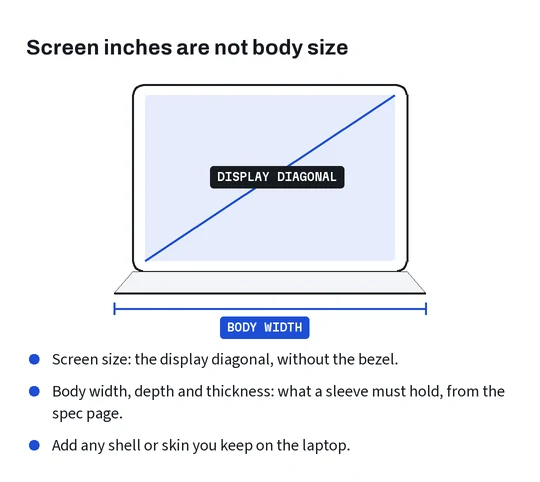
Laptop sleeve listings lead with a screen size in inches, and that number is the wrong measurement for a sleeve. Screen size is the diagonal of the display, corner to corner, without the bezel. Two laptops sold as the same screen size can have bodies of different widths and depths, because bezels and bodies differ from one model to the next.
What a sleeve has to swallow is the body: width, depth and thickness at the thickest point, from the spec page of your exact model, plus anything you keep on it such as a clip-on shell. Good sleeve listings give inside dimensions in centimeters in a size chart picture. Compare those with the body and leave a little room; zips and padding take some of it.
The trap works like this. A seller picks an inside size that suits the laptops they had in mind when they wrote the title. A laptop with the same screen diagonal and a wider or deeper body will not go in, and nothing in the title warns you. The size chart picture, in centimeters, is the line to read; the screen size in the title is the line to ignore.
Clip-on shells and the exact laptop model
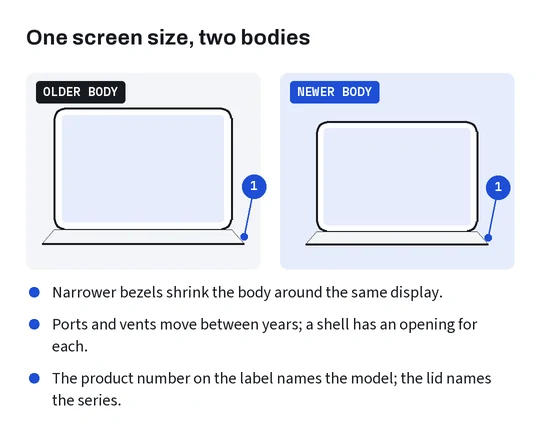
A clip-on shell grips the laptop at its corners and edges and has openings for every port and vent, so it follows one model exactly. The same screen size from two different years is usually two different shells. One laptop maker’s support page warns that the name and number on the front often stand for a series of similar-looking models with different options and parts, and points owners to the product number on the label instead.
Another maker’s identification page lists its laptops by model identifier and part number and tells owners to read the serial number on the underside when the machine will not start. Either way, the useful string is on the label or in the system information screen, not on the lid.
Check ports on both sides, vent slots and rubber feet underneath: those are where a shell made for a neighboring model gets in the way.
E-reader covers and the generation number
E-readers are the opposite of laptops: the body size barely changes between generations, and covers still follow the generation exactly.
Covers for e-readers clip around the edges or hold the reader on a frame, and the frame is shaped for one generation: button positions, the charging port, the corner radius and on many covers a magnet that wakes the screen when the cover opens. The maker of the most common readers names generations by number on older models and by release year on newer ones, and its identification page shows the device name under Settings, Device Options, Device Info on selected devices.
The same page notes that not every generation has been sold in every country. A cover listing written in China may name a generation by a number or year you have never seen on a box in your country, or describe it by its features. Match the features on the maker’s list (screen size, buttons, port) with the option photo rather than trusting the label alone.
Sleeves and covers in one parcel
Sleeves are forgiving and covers are not, which makes a combined order a useful test of your notes. If you order a laptop sleeve and a reader cover together, write down the body size for the first and the generation for the second, and match each option separately.
A sleeve that turns out a little roomy still does its job. A cover for the wrong reader generation does not close, and an opened cover is a used item for return purposes. The difference is worth an extra minute with the size chart and the identification page before you pay.
When both arrive, try the sleeve first: it is forgiving and its bag can usually be reused. Leave the cover sealed until the label photo, or the generation printed on its box, matches your note.